Category: General

Tool of the week: k4dirstat

comments Comments Off
By TeK, December 10, 2011 04:01


HeyHo, the disc is full, the disc is full…, but i found a great help:


KDirStat – Directory statistics.

Shows where all your disk space has gone
and helps you clean it up
.”


Installation in Debian and Ubuntu:

$  apt-get install k4dirstat


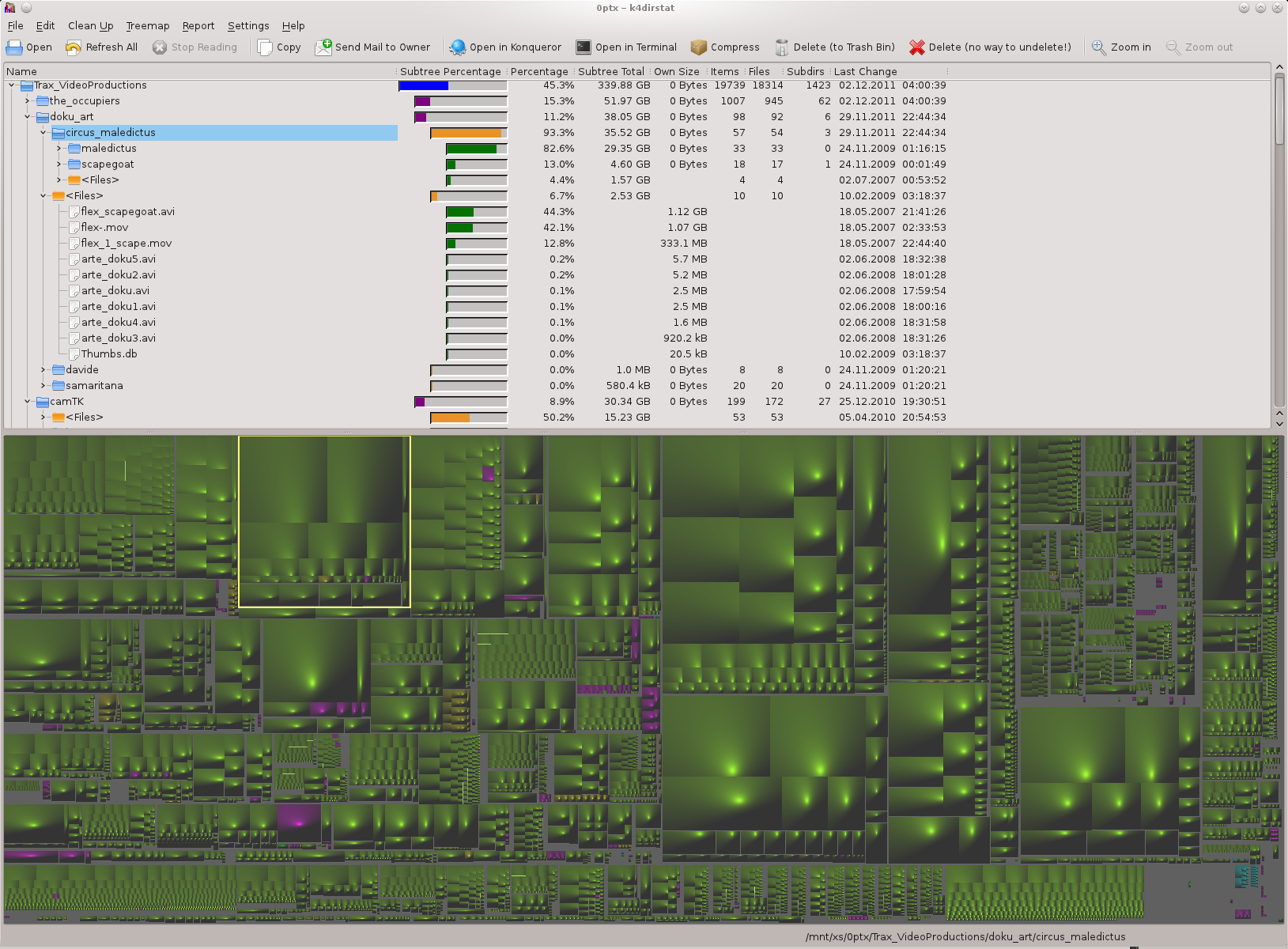
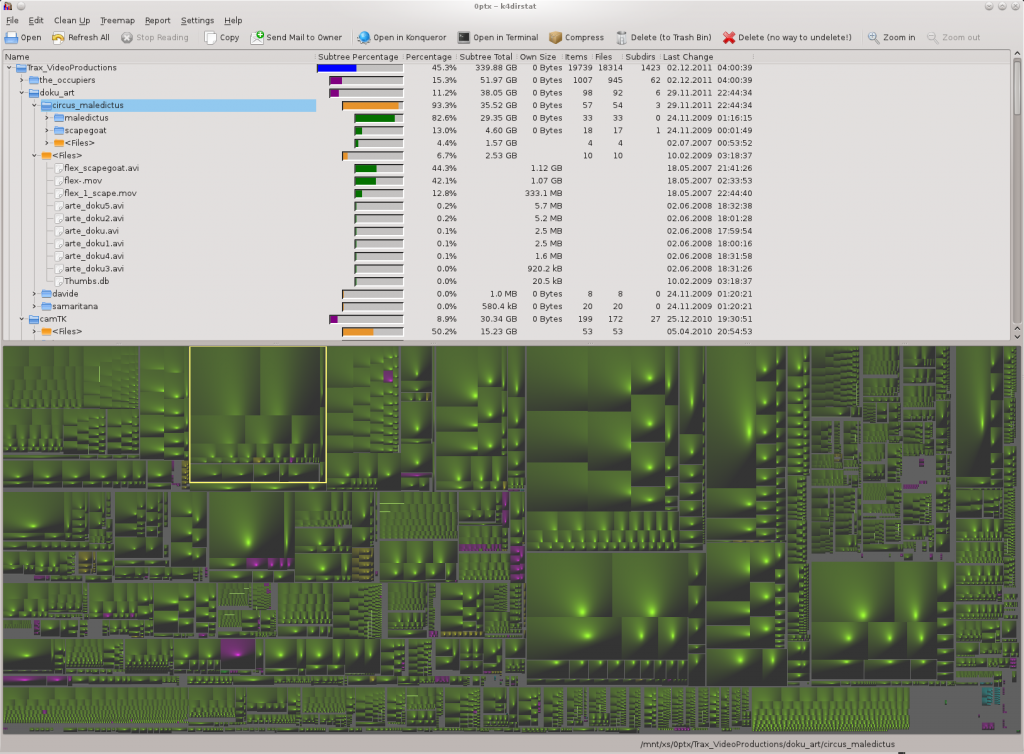
I think the screenshot says it all:

Every cube in the tree-map illustration represents a file or a directory. By their size its instantly visible where all the space is used up. You can click the big blocks to get a direct link to the file in the tree.
Share

Chaos Computer Congress Mirror – Videos of CCC Talks

By TeK, January 5, 2011 08:07

There was some disc space free on a server and so we collected CCC Congress videos of the last years:

You can watch the talks directly in the brower

or start a player-program like vlc or mplayer with the http:// url

or download the file with “save as..”
Share

MirrorBot Video – Moving Projections in Action

By TeK, January 3, 2011 02:03
YouTube Preview Image

Demo Video of the “moving projection” video installation at Suchtfaktor elekto party in MIKZ, Berlin 03.2010
Monthly, every 1. saturday, also in 2011!

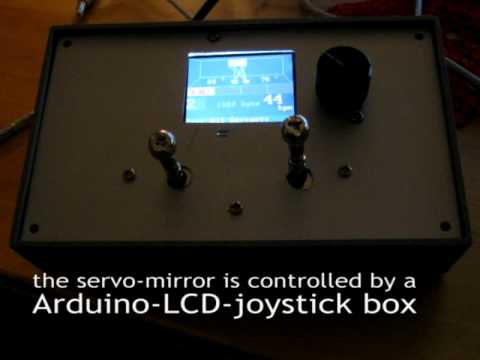
The “MirrorBot” is a Arduino minicomputer system to control the position of videobeamer projections. Two servomotors move a mirror in X- and Y- axis, which reflects the beamer image. The servos are controlled by a micro-controller with an LCD. It can play various movement pattern programs automatically, adjusted to the music speed by setting BPM or ‘live’ with the joystick and button.

Headsquatter VJs use it to move visuals around the whole dance floor when playing in clubs. Moving projections become a live instrument! :D

more info in older posts :

lab.synoptx.net/2010/03/13/mirrorbot-v3-in-action

Music by droidsystem.com many ThanX!!

Share

Science meets Art – new Website released

By TeK, August 29, 2010 04:17

www.sciencemeetsart.net

.. is a project of berlin based artists and university scientists in cooperation with prohelvetia.ch

Aritsts and Scientists colaborate for some weeks and present the results in an excebition.

They are going to post their latest results in this new blog during the next weeks: sciencemeetsart.net/blog

If you are based in berlin, checkout the events: Science meets Art —  Pilotprojekt Termine


Projekte

Ping Qiu

Web-Administration und Projektkoordination

bees&butterflies. artists in (e)motion, Carola Muysers

Grafik
Synoptx Webentwicklung, ZBognetti,  www.synoptx.net

Programmierung
Synoptx Webentwicklung, www.synoptx.net

Beratung / Suschmaschinenoptimierung
Synoptx Webentwicklung, www.synoptx.net

btw.: Have a look to this blog for more cultural berlin info: www.berlin.woman.de

Share

Debian Appreciation Day!

By TeK, August 17, 2010 17:35

Thank Debian http://thank.debian.net

or burn some CPU cycles for debian! ;-)

<script type="text/javascript" src="http://valessiobrito.info/projetos/debian/others/dad/happydebian.js"> </script>
Share

Timetracking Linux and Web Tools

By TeK, August 15, 2010 04:04

Here’s a comparison of some programs in debian/ubuntu repositories, that help to keep track of your worktimes

KTimetracker
This is in the Debian and Ubuntu repositories. it is programmed for the KDE window environment, but if you have all the KDE libraries already, just run this in a terminal:

wait! update first

it’s best practise to update the repositories before installing something, to get the latest versions:

sudo apt-get update

btw: sudo is only required in ubuntu, in debian type ‘su’ to get root access

sudo apt-get install ktimetracker

++
+ Nice and simple interface.
+ Timers
You can start and stop a timer when you begin and end a working session so you get the exact time.

+ It can even watch your desktops, including the virtual ones, so you can put all your work windows for example on desktop 2 and switching to 1 is enough to do something else and stop the counter. you will wonder about the short times it tracks (without mailchecks, etc.) !

must test the export..

For me this wins, because of the desktop tracking and  (sub) timers!


Gnome Time Tracker

Installation in Debian / Ubuntu:

sudo apt-get install gnotime

++
Nice interface with description and “diary” textfields. Nice list of projects and timers to count worktime on a daily basis are integrated.


Some things in the interface are broken or not understandable: export does not allow to select a file, maybe something must be created first?

Subprojects? must test..


Tine2.0 Web Groupware

++
Nice webinterface. Besides Todolist, Calendar, CRM and few more modules, a Time-tracking tool is built into this web groupware.

+ So called “Time-accounts” represent the different projects. You can add “time-sheets” to these projects for every session or ideally the hours of every day. There are filters to show only one project or a relevant period or user. You can save these filter options as a favorite view. That’s really cool and flexible! One problem is, that you cannot redefine the default favorite, which it show at first.

+ Tine can store € per hour, “billable” and more billing infos, so you it automatically calculates the full time and price of a project.


There is no counter to start and stop the session times. You can only enter the periods, after you finished the day work. Its useful to keep track of the works of a team, but if you want to track the exact times, you need another timer-software and enter the periods from there to tine  :-/

Must test:  Exports!   It ~should~ export .ods, which would be reaaaaally helpful to present the time-sheet to clients directly or put it in a bill! But maybe i have to fill a bug report on that..


eGroupware

Is a good, old PHP web groupware with many, many modules. The project module interface is not easy to understand, but when you get it, you can even use time counters online.

++
Many functions in the projects module,…


EGroupware is a huge system, only for timetracking you do not want to install it. There are many options to setup, specially if there is more than one user, it gets really complicated to give correct permissions to everyone.


OpenOffice Table with Formulars

still the easiest and best solution?

++
+ Table calculation software offers a nice overview with dynamic calculations: Press [F2] in a table cell and you can enter formulars for calculation. This way, you can, for example, enter exact minutes and get hours by [cell] * 60.

+ In OpenOffice Writer you can keep track of times in a simple table inside a odt text-office document. No need to use Calc, the Table calculation

Also the other programs offer ways to enter billing info like € per hour.


- Teamwork? Its not easy to work together on stupid office documents. They are practically always locked by other users ;-)

.odt file coming soon..

Share

Eco-sostenibile search engines

By ZBog, August 13, 2010 21:06

Snufu suggested Ecosia on this Blog

Search engine test

Ecosia.org

—————————-

I was looking  for:

(Gitschiner strasse 61)
At first it gave not such a good result compared to other search engines.

1.wrong result
2.wrong result
3.wrong result
4.wrong result
5.wrong result
6.ABC-ETech
robot portal:  http://www.pointoo.de/poi/Berlin/Abc-etech-775582.html
7.wrong result
8.ABC-ETech
www.abc-etech.de
robot portal: http://www.berlin.city-map.de/01110000/abc-etech
9.wrong result

but as second chance I searched a Blender Video Sequence Editor
The research gave better quality
then I decided to give a chance to Ecosia to be my eco “sucht-machine”
and I have installed the add-on for Mozilla many browsers are compatible

znout.com
I asked Znout the same questions :

(Gitschiner strasse 61)
gave medium results, also if reacts super-fast, the results are 7 matching on 10

(Blender video sequence editor)
full prestation fast and correct

But it anyway uses the google search engine.
———-
another one to test: Forestle.org

Share

search engine comparisation

By ZBog, August 13, 2010 02:50

I have let it run a question  “gitschiner strasse” in multiple search engine, just to check  REALLY  what was happening on a Berlin Address
and combine it with my curiosity to run a quality test

Google
————————————–

(Question:  Gitschiner 61)

1.Flow tech GmbH
beim “Silber Mitglieder” von einen SportVerein

http://www.mtv1860.de/handball/index.php?option=com_content&view=article&id=252&Itemid=147

2.Beim Robot-Portal: http://www.cylex-telefonbuch.de/suche/deutschland/bundesland-berlin/stadt-berlin/l-0049-plz–strasse-gitschiner%20str._name–s1_filter-0.html
ABC-ETECH Inh. Dietmar Brillski Elektrotechnik (0) 0 5
beim Robot-Portal: http://www.klicktel.de/branchenbuch/abc-etech-inh-dietmar-brillski-elektrotechnik,berlin,4617500,QOIVZNWW92A5C7.html
3.Zebra Comunication Gmbh
info@ethno-trade.de
ethno-trade.de
Beim Schlechte Evil Portal Pop up Bastards links:

http://web2.cylex.de/firma-home/zebra-communications-gmbh-2352671.html

4. http://www.firmendb.de/firmen/6302631.php
beim Robot-Firmen Portal with no firma signed in (:|)
5.K. Mumcu
beimbeim Robot telephone catalogue

Yahoo  ??
——————

( Gitschiner strasse 61)

1.The first, Top, search result is wrong give the number 91 – Buahahah -
2.wrong result : strasse nummer 94
3.  wrong result  94
4.“Dreieck Funkturm (motorway Hannover-Nürnberg), urban motorway to Tempelhofer Damm – Mehringdamm – Gitschiner Strasse – Skalitzer Strasse – Warschauer Straße “
5.wrong result
6.….

(Yahoo…Gitschiner 61)
1.Youtube- Miss Moth
2.wrong result
3.wrong result
4. Zebra comunication
5. Tutorial diversion (miss moth
6. wrong result
7. http://reinhold-friedl.de/
8.” JANUARY 24
REINHOLD FRIEDL / PHILIP SAMARTZIS / MICHAEL VORFELD – inside piano, prepared electric guitar, percussion, electronics
8P, new loft Christopher Dell
http://www.zeitkratzer.de for information
(culled from Sarah Wong – danke!) “beim: http://www.chaindlk.com/community/index.php?topic=3422.0
9. wrong result
10. Robot route Map

(Yahoo failed the exame)
Aaargh I have used YahOO()()00°° !!!  I M DOING ONLY FOR RESEARCH, CHILDREN DO NOT DO IT AT HOME!
————————————————————————————————–

—————–

Answers.com
—————–
(Gitschiner strasse 61)

1.FE61
Offünungyeit 19:30 (jeden 1. und 3. Do im Monat)
Beim a sharing english website, human generated content, It specify on the page that in berlin they spaces are legal

http://www.qype.co.uk/lists/610322-Squats-in-Berlin

2.Musicians: Christopher Dell (vibraphon), Christian Ramond (bass), Felix Astor (drums) www.christopher-dell.de
Recent CD: DRA: DRAREAL (edition niehler werft 2004)
Christopher Dell, c/o Institut für Improvisationstechnologie,
++49 (0)30 6167-5351, Fax ++49 (0)30 6167-5351, cd@christopher-dell.de
Beim: Bundeskonferenz Jazz (German Jazz Meeting) :http://www.bkjazz.de/index.php?id=78
3.[24/1/2009] Berlin, Germany
new loft, 8:00 pm, free entry
Christopher Dell, Gitschiner str. 61, 10969 Berlin
Beim musicianßs site http://www.reinhold-friedl.de/

http://ecosia.org

—————————-

(Gitschiner strasse 61)

1.wrong result
2.wrong result
3.wrong result
4.wrong result
5.wrong result
6.ABC-ETech
beim robot portal:  http://www.pointoo.de/poi/Berlin/Abc-etech-775582.html
7.wrong result
8.ABC-ETech
www.abc-etech.de
beim  robot portal: http://www.berlin.city-map.de/01110000/abc-etech
9.wrong result

Ask.com
———————————————–

(Gitschiner strasse 61)

BTW NOTICE: Cool simulated pop up setup to turn off the search bar on the top of the blank page results for ever, in cookie, its Css styled not external js nasty-popup

1.“    March 27th, 2010, Villa Newman (Gitschiner Str. 61), Berlin, MISS MOTH: “Home Tour – the Answers to Solutions”
March 13th, 2010, Villa Newman (Gitschiner Str. 61), Berlin, Launching MISS MOTH       ”
beim : http://www.tutorialdiversions.org/1.html
a.http://www.youtube.com/watch?v=Uuwg9Fv-LAI
b.http://www.youtube.com/watch?v=0ZLM6atqEJ0
c.http://www.myspace.com/mistressmoth
d.qype → Fe61
e.Edition Niehler Werft
Music Label

http://www.christopher-dell.de/enw.htm

Beim: http://rateyourmusic.com/label/edition_niehler_werft/

———————————–

NO results:
—–

(CC http://search.creativecommons.org/ )

———
(Amazon . Gitschiner strasse 61)

————
(de.wikipedia no results / similar results)

well those last search engines are empty but are the engines that we can fit into….. then we will fill theme;)

Share

Small Render Farm or at least a Render Flat

By ZBog, July 31, 2010 13:39

Producing small videos, animations and vjset live as a Freelancer, is easy questioning yourself about building a Render Farm machine to allow to work on huge amount of video data. In my case it will be maximum a Render Flat.

I m Not interested in producing cinema movies, but compositing for shorter projects. I use Blender, but I also use Resolume for vjing, I know how many frames go lost trying to record generated images, or live sets in digital format.

The machine must be cheap for the materials and eco-compatible with low energy consume. What is normally suggested to Do is : Do not spend more then 30% of what you will spend on a true one. A true one will cost a lot – around 30.000€ (Render Stream blog entry) minimum 15.000€, the 30% is between 4500€ and 9.000€

I cannot spend more then 3000€

For Networking TK is using old PIII mother board, but for video… I m afraid with low quality material you realize a machine with the same price of a powerful single computer that can maybe do the same work alone. Lets say I ll start with 8 cpu that will cost around 170€ each one for a total of 1200€ . There is still to calculate the hours of work of the technicians. After you got the case and cables we pass on the softwares, to connect the CPU with a workload management system Condor High Throughput Computing that will optimize the CPU usage, at least for performances, if not for eco-sustainability (but this sofware solution is even too big for my needs) .

The Big Buck Bunny used Sun’s Grid to coordinate average of 150 CPU’s at a time! producing around 4h per frame.

The best links to projects about DIY Render Farm found today: Helmer history (self built machine) this lovely monster is my target a cheap homemade in a great Iron case! he promise “…this machine just costs as much as a better standard PC, but has 24 cores that run each at 2.4 Ghz, a total of 48GB ram, and just needs 400W of power!!” cool explication DIY

MY ABSURDS Idea Considering I m Berlin based will be great to build the machine in horizontal and place it like a pavement on the floor, with a pipeline for ventilation with 2 exits, 1 outside the room and 1 inside the room. That can be a good winter solution to substitute coal heating for cheap rents and let in summer the hot air out

Niklas and Tk suggest both to use a Blender script and Tk seems to be convinced to can use one of our Networks computer, with 2 or 2×2 GHz, but I m speaking about a video-brain, usable for producing different kinds of videos, not an unique Blender output, for example a compositing of stop motion in HD with digital animation. A machine that allows you to promise good quality fast rendering, remember that is a job standalone to render, can even bring specific clients. I believe our 2×2 ghz network machine is enough to start, but in the while you render you will have no much possibility to use the computer otherwise. and you cannot risk to loose some frames for overloading and restart rendering the scene. Anyway is a long time project that can be realized before 2012, nothing now and nothing fast. Is only that I have 1000 projects and Im always in doubt how to invest the money, professional video camera or professional computer? both are around 3000€ Analyzing the market and my clients I ll say our computers are always running and the camera you can rent it for short period.

Share

Shell Basics Workshop Report n. 3/3 Juli 2010

By ZBog, July 27, 2010 03:24

>> nerdcafe Vetomat 26.7.2010        snufu/fuzzy speach, Zbog report
SHELL BASICS N°3

$ ncal -w

calendar for the current week (it shows the all month)

$ red

open a (strange) text editor in the terminal to go out: q + enter

$ mcedit filename

the famous midnight-command editor (apt-get install mc)

$ mc

clone of an oldschool filemanager

—————————-

$ tput

initialize a terminal

$ reset

query terminfo database
(clear the complete terminal window)

————————–

$ cp "source" "destination"

copy files in directory (is an automatic paste)
=======================================================================================

$ mkdir "name"

make directory “name”

$ ls -l

list all the files and folders in the directory

(-l)     use a long listing format
as the details mode in a location window

$ ls -l "directory-name"

is giving the list of the called directory

$ pwd

Print Working Directory
shows the actual folder content

$ cd ..

go one level up

$ if cd /somewhere; then date;

Only if there is cd folder called like so then show the date

$ echo mario > test/.secret

with the point on the new name it will create a hidden file that is  normally not shown in the interface and  in the command ls

$ ls -a

to recall a hidden file in a list  -a

$ echo /.*

will call also all the hidden files

./

it represents the current directory

../

it represents the parent directory
—————————

$ rm filename

remove file

$ rm /dir/

remove folder

$ rm -r foldername

empty the directory    (delete the files but keep the folder)
—————————-

$ set -x
$ set +x

set
start the behavior session
+
the commmand string is printed on screen before the execution
-
the command string session will not show anymore the command screen

$ echo foo | cat

“pipe echo foo into cat” write the info foo into the file and show the content (cat)
the 2 commands are connected to eatch other and have the same content

Report of Linux-works shell meeting in Vetomat 26.Juli.2010

Share
WordPress Open Source Blog System
SynOptX Lab Theme